> ## Documentation Index
> Fetch the complete documentation index at: https://help.oskaros.com/llms.txt
> Use this file to discover all available pages before exploring further.
# Changelog
> We’re constantly working to make OskarOS better for you
## Oskar's November Boost —200+ Improvements You Will Feel
 Oskar just received one of the biggest quality upgrades to date — over 200 improvements aimed at making your booking system smoother, clearer, and more personal.\
Your Booking Page looks better, your workspace is more secure, and Oskar himself is now ready to guide you whenever you need help.
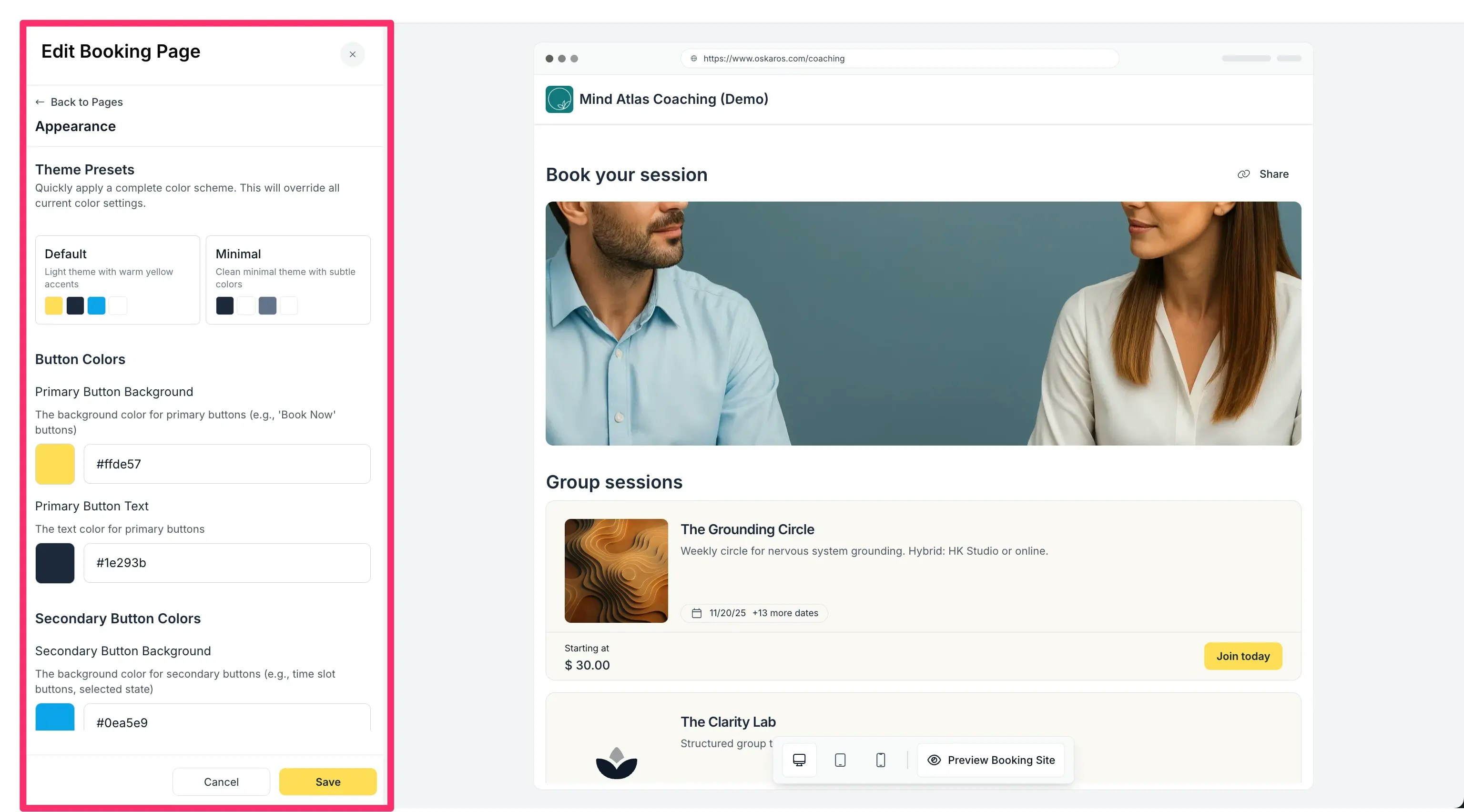
### A Booking Page That Actually Feels Like Your Brand
Your Booking Page is now fully yours — no code required.
* Pick custom colors for buttons, cards, navbars, and backgrounds.
* Choose from 50+ clean, modern font families.
* Add custom CSS safely (Oskar prevents anything that might break your layout).
* Start from polished presets that automatically pass accessibility contrast checks.
**Try it:**\
**MANAGE → Booking Page → Appearance**\
Watch your design update live and publish with one click. And there is so much more coming.
Oskar just received one of the biggest quality upgrades to date — over 200 improvements aimed at making your booking system smoother, clearer, and more personal.\
Your Booking Page looks better, your workspace is more secure, and Oskar himself is now ready to guide you whenever you need help.
### A Booking Page That Actually Feels Like Your Brand
Your Booking Page is now fully yours — no code required.
* Pick custom colors for buttons, cards, navbars, and backgrounds.
* Choose from 50+ clean, modern font families.
* Add custom CSS safely (Oskar prevents anything that might break your layout).
* Start from polished presets that automatically pass accessibility contrast checks.
**Try it:**\
**MANAGE → Booking Page → Appearance**\
Watch your design update live and publish with one click. And there is so much more coming.
 ### Oskar’s AI Documentation Assistant
Stuck on something? Ask Oskar — directly inside the app. Our documentation hos gotten a whole lot better and so has Oskar.
* Search the full documentation with one sentence.
* Ask “How do I…?” and get real answers instantly.
* Open it from the sidebar without losing your flow.
**Try it:**\
Click the small **Oskar icon** in the top right of your dashboar.
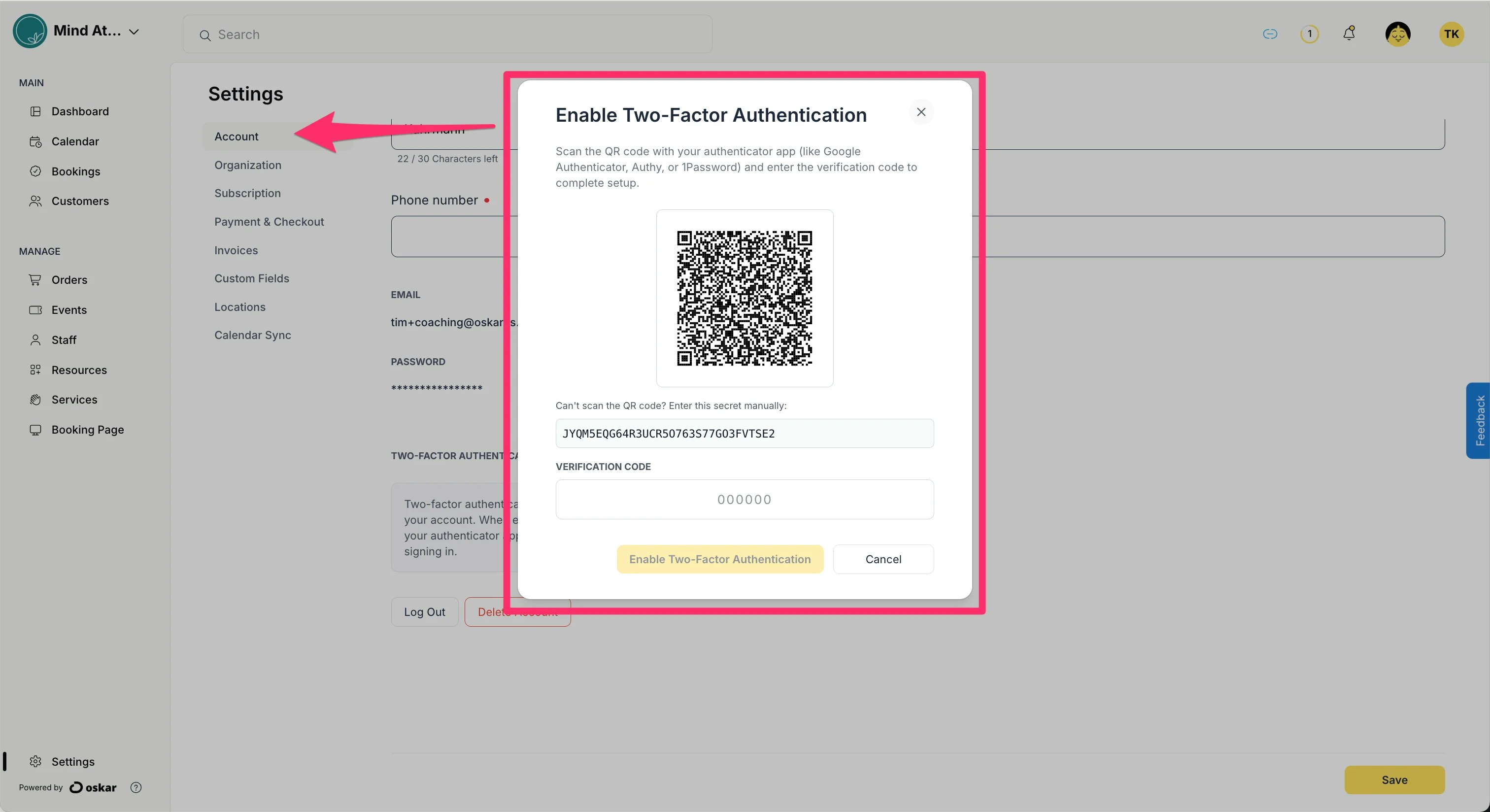
### Multi-Factor Authentication (MFA)
Security you don’t have to think about.
* Use any authenticator app
* Every team member can activate MFA individually.
* Smooth login flow once set up.
**Try it:**\
**Top Right Use Menu → Account & Settings → Account**
### Oskar’s AI Documentation Assistant
Stuck on something? Ask Oskar — directly inside the app. Our documentation hos gotten a whole lot better and so has Oskar.
* Search the full documentation with one sentence.
* Ask “How do I…?” and get real answers instantly.
* Open it from the sidebar without losing your flow.
**Try it:**\
Click the small **Oskar icon** in the top right of your dashboar.
### Multi-Factor Authentication (MFA)
Security you don’t have to think about.
* Use any authenticator app
* Every team member can activate MFA individually.
* Smooth login flow once set up.
**Try it:**\
**Top Right Use Menu → Account & Settings → Account**
 ### Activity Log
Clarity for every action inside your workspace.
Oskar now tracks:
* Booking edits
* Order changes
* Customer updates
* Payments
* Team activity
Search, filter, and export — everything stays organized.
**Try it:**\
\*\*Organization Menu \*\*(top left) **→ Activity Log**
### Activity Log
Clarity for every action inside your workspace.
Oskar now tracks:
* Booking edits
* Order changes
* Customer updates
* Payments
* Team activity
Search, filter, and export — everything stays organized.
**Try it:**\
\*\*Organization Menu \*\*(top left) **→ Activity Log**
.webp?fit=max&auto=format&n=IGIk09GZwha8MxlI&q=85&s=ce20fee97701c567920bbf7a54b6456c) ### A Friendlier First Day — The New Dashboard Tour
New users and new teammates now start with a warm, simple guided tour.
* Walkthroughs of Booking Pages, Events, Staff, and Orders
* Easy to pause, restart, or skip
* Automatically adapts to your type of business
**Try it:**\
You’ll see a banner at the top — click **Start Tour** anytime.
### Sign in with Microsoft
Logging in just got easier.
* One-click sign-in with your Microsoft or Office 365 account
* Enterprise-grade authentication
* Everything stays synced
**Try it:**\
Select **Sign in with Microsoft** on the login screen.\
(Full Microsoft Calendar sync is on the way.)
### Better Event Management
Events are now easier, cleaner, and more predictable.
* Clear pagination for long event series
* A proper history of all past events
* Safer deletion logic that protects active bookings
* A timezone picker that finally handles global teams correctly
**Try it:**\
**MANAGE → Events**
**Got questions or feedback?** Click the blue Feedback button on the right side of your account or go to [https://www.oskaros.com/feedback](https://www.oskaros.com/feedback)
## October 2025 Update: Multi-User Accounts & Role-Based Permissions
### A Friendlier First Day — The New Dashboard Tour
New users and new teammates now start with a warm, simple guided tour.
* Walkthroughs of Booking Pages, Events, Staff, and Orders
* Easy to pause, restart, or skip
* Automatically adapts to your type of business
**Try it:**\
You’ll see a banner at the top — click **Start Tour** anytime.
### Sign in with Microsoft
Logging in just got easier.
* One-click sign-in with your Microsoft or Office 365 account
* Enterprise-grade authentication
* Everything stays synced
**Try it:**\
Select **Sign in with Microsoft** on the login screen.\
(Full Microsoft Calendar sync is on the way.)
### Better Event Management
Events are now easier, cleaner, and more predictable.
* Clear pagination for long event series
* A proper history of all past events
* Safer deletion logic that protects active bookings
* A timezone picker that finally handles global teams correctly
**Try it:**\
**MANAGE → Events**
**Got questions or feedback?** Click the blue Feedback button on the right side of your account or go to [https://www.oskaros.com/feedback](https://www.oskaros.com/feedback)
## October 2025 Update: Multi-User Accounts & Role-Based Permissions
 Your team just leveled up. Oskar now supports **dedicated staff accounts** with tailored permissions — so you can invite colleagues, instructors, or assistants into your workspace without sharing logins or crossing wires. Everyone gets their own seat, their own access, and their own responsibilities.
### What’s New
* **New “Staff” Section:** Manage internal users under **Left Menu → MANAGE → Staff**.
* **Invite Flow:** Use **Invite Staff Member** (top right) to send secure invitations via email.
* **Role-Based Access:** Choose between
* **Owner** — full access, including billing and workspace deletion
* **Manager** — broad management rights without deletion powers
* **Staff** — access limited to assigned resources, events, or colleagues
Your team just leveled up. Oskar now supports **dedicated staff accounts** with tailored permissions — so you can invite colleagues, instructors, or assistants into your workspace without sharing logins or crossing wires. Everyone gets their own seat, their own access, and their own responsibilities.
### What’s New
* **New “Staff” Section:** Manage internal users under **Left Menu → MANAGE → Staff**.
* **Invite Flow:** Use **Invite Staff Member** (top right) to send secure invitations via email.
* **Role-Based Access:** Choose between
* **Owner** — full access, including billing and workspace deletion
* **Manager** — broad management rights without deletion powers
* **Staff** — access limited to assigned resources, events, or colleagues
 * **Granular Permissions:** Fine-tune what each staff member can see and manage.
* **Email-Based Onboarding:** Invitees get a secure link to create their password and join your workspace.
* **Instant Access Control:** Resend invitations, remove users, or revoke access at any time.
* **Resource → Account Migration:** Convert resource profiles into full user accounts with one click.
### Why It Matters
Teams run better when everyone has the right access — and only the right access.\
This update gives studios, clinics, agencies, retreats, and classrooms a secure and clean way to collaborate without stepping on each other's toes.
Need to let someone go? Remove access with one click — their data stays exactly where it belongs.
[Full documentation here](/documentation/setup-and-configuration/staff-accounts-and-permissions)
***
## September 2025 Update: 🚀 Waitlists + QR-Code-Check-Ins + Pending Orders
* **Granular Permissions:** Fine-tune what each staff member can see and manage.
* **Email-Based Onboarding:** Invitees get a secure link to create their password and join your workspace.
* **Instant Access Control:** Resend invitations, remove users, or revoke access at any time.
* **Resource → Account Migration:** Convert resource profiles into full user accounts with one click.
### Why It Matters
Teams run better when everyone has the right access — and only the right access.\
This update gives studios, clinics, agencies, retreats, and classrooms a secure and clean way to collaborate without stepping on each other's toes.
Need to let someone go? Remove access with one click — their data stays exactly where it belongs.
[Full documentation here](/documentation/setup-and-configuration/staff-accounts-and-permissions)
***
## September 2025 Update: 🚀 Waitlists + QR-Code-Check-Ins + Pending Orders
 This release brings new ways to keep your bookings fair, your events full, and your check-ins seamless. From waitlists to QR scans, Oskar continues to make running your business smoother.
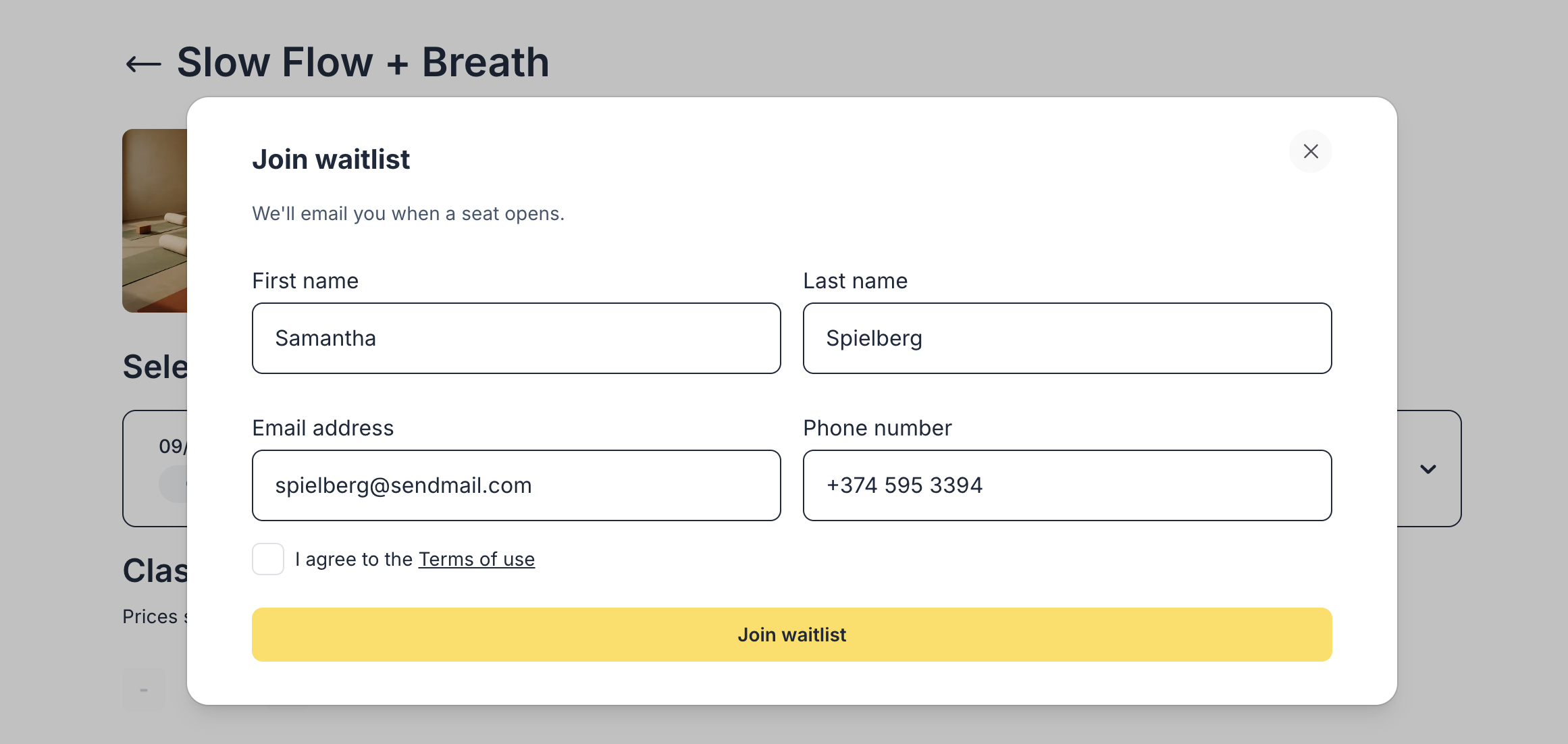
### Waitlists for Events & Courses
Never turn clients away again. When an event is full, they can join a waitlist instead.
* Set a waitlist capacity (or leave it unlimited).
* Enable auto-offers to email the next client in line with a 12-hour claim link.
* Manage the queue directly from any event or occurrence.
* Issue, resend, or expire offers manually whenever needed.
[Read more here](/documentation/setup-and-configuration/events-and-courses)
### QR Code Check-Ins (and Check-Outs)
Professional, touch-free entry for events, courses, and services.
* Enable in **Payment & Checkout** settings.
* Clients receive a unique QR code in confirmation emails.
* Staff can scan from **Quick Actions → Scan QR Code** or attendee lists.
* Works on any camera-enabled device.
* Manual fallback included.
* Track **Check In** and **Check Out** live.
[Read more here](/documentation/bookings-and-scheduling/qr-code-check-in)
### Pending Orders
Transparency for every booking in progress.
* Slots are held for 15 minutes during checkout.
* Admin-created bookings also create a temporary hold.
* Pending orders can be reopened, edited, and completed before expiry.
Prevents accidental double bookings and gives you visibility of everything happening behind the scenes.
[Read more here](/documentation/bookings-and-scheduling/pending-orders)
### Why It Matters
These updates help you maximize attendance, avoid empty slots, and give clients a frictionless experience — whether you're running yoga classes, workshops, conferences, or hotel activities.
***
## August 2025: 🚀 Oskar 1.0 + New Website
This release brings new ways to keep your bookings fair, your events full, and your check-ins seamless. From waitlists to QR scans, Oskar continues to make running your business smoother.
### Waitlists for Events & Courses
Never turn clients away again. When an event is full, they can join a waitlist instead.
* Set a waitlist capacity (or leave it unlimited).
* Enable auto-offers to email the next client in line with a 12-hour claim link.
* Manage the queue directly from any event or occurrence.
* Issue, resend, or expire offers manually whenever needed.
[Read more here](/documentation/setup-and-configuration/events-and-courses)
### QR Code Check-Ins (and Check-Outs)
Professional, touch-free entry for events, courses, and services.
* Enable in **Payment & Checkout** settings.
* Clients receive a unique QR code in confirmation emails.
* Staff can scan from **Quick Actions → Scan QR Code** or attendee lists.
* Works on any camera-enabled device.
* Manual fallback included.
* Track **Check In** and **Check Out** live.
[Read more here](/documentation/bookings-and-scheduling/qr-code-check-in)
### Pending Orders
Transparency for every booking in progress.
* Slots are held for 15 minutes during checkout.
* Admin-created bookings also create a temporary hold.
* Pending orders can be reopened, edited, and completed before expiry.
Prevents accidental double bookings and gives you visibility of everything happening behind the scenes.
[Read more here](/documentation/bookings-and-scheduling/pending-orders)
### Why It Matters
These updates help you maximize attendance, avoid empty slots, and give clients a frictionless experience — whether you're running yoga classes, workshops, conferences, or hotel activities.
***
## August 2025: 🚀 Oskar 1.0 + New Website
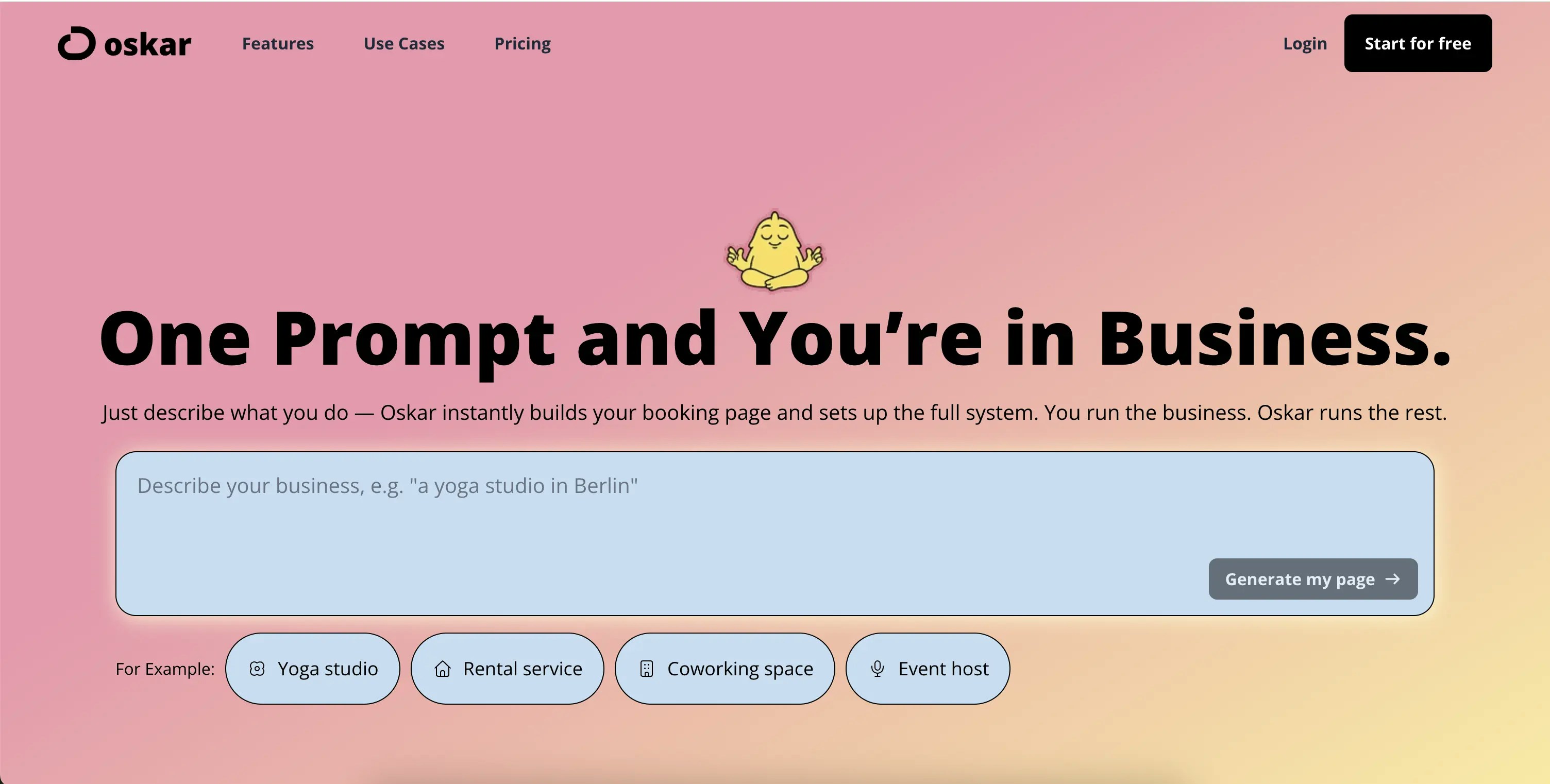 **Run your business on autopilot with Oskar 1.0 — the world’s first AI Business System built for service providers.**
We’ve also relaunched with a new name and a new look:
* **OskarOS → Oskar.** Shorter, sharper, more focused — just like the product.
* **A fresh website** at oskaros.com that reflects our mission: building software that bends around you, not the other way around.
When we started Oskar, we asked a simple question:\
**👉 Why does running a service business still feel harder than it should?**
Most software forces you to adapt to it. **Oskar flips the model:** one chat prompt sets up your entire booking system.
**✨ What’s New in Oskar 1.0**
Oskar has grown from a booking MVP into a full operating system. Highlights:
* **Smarter Booking Logic** — Service-first, resource-first, event-first flows; tracked units; multi-booking carts.
* **Events & Courses Revamped** — Tiered pricing, recurring events, organizers, automatic blocking.
* **Two-Way Google Calendar Sync** — Keep your real-life availability fully aligned.
* **Integrated Payments** — Stripe, refunds, offline payments, payment links.
* **Custom Booking Page Design** — Drag-and-drop layouts, embed options, QR codes.
* **Multi-Language Support** — English, German, Spanish, French.
* **AI Roadmap** — Upcoming: Oskar Agents, invisible AI coworkers handling admin and scheduling.
One prompt, and you're in business. Oskar runs the rest.
**🙌 Thank You**
To our early community: you shaped Oskar 1.0. As a launch bonus:\
Use **HUNTER1** for 30% off monthly and annual plans — valid until December 2025.
[👉 Try Oskar now](https://app.oskaros.com/register)
## June 2025: Our New Documentation Is Live!
**Run your business on autopilot with Oskar 1.0 — the world’s first AI Business System built for service providers.**
We’ve also relaunched with a new name and a new look:
* **OskarOS → Oskar.** Shorter, sharper, more focused — just like the product.
* **A fresh website** at oskaros.com that reflects our mission: building software that bends around you, not the other way around.
When we started Oskar, we asked a simple question:\
**👉 Why does running a service business still feel harder than it should?**
Most software forces you to adapt to it. **Oskar flips the model:** one chat prompt sets up your entire booking system.
**✨ What’s New in Oskar 1.0**
Oskar has grown from a booking MVP into a full operating system. Highlights:
* **Smarter Booking Logic** — Service-first, resource-first, event-first flows; tracked units; multi-booking carts.
* **Events & Courses Revamped** — Tiered pricing, recurring events, organizers, automatic blocking.
* **Two-Way Google Calendar Sync** — Keep your real-life availability fully aligned.
* **Integrated Payments** — Stripe, refunds, offline payments, payment links.
* **Custom Booking Page Design** — Drag-and-drop layouts, embed options, QR codes.
* **Multi-Language Support** — English, German, Spanish, French.
* **AI Roadmap** — Upcoming: Oskar Agents, invisible AI coworkers handling admin and scheduling.
One prompt, and you're in business. Oskar runs the rest.
**🙌 Thank You**
To our early community: you shaped Oskar 1.0. As a launch bonus:\
Use **HUNTER1** for 30% off monthly and annual plans — valid until December 2025.
[👉 Try Oskar now](https://app.oskaros.com/register)
## June 2025: Our New Documentation Is Live!
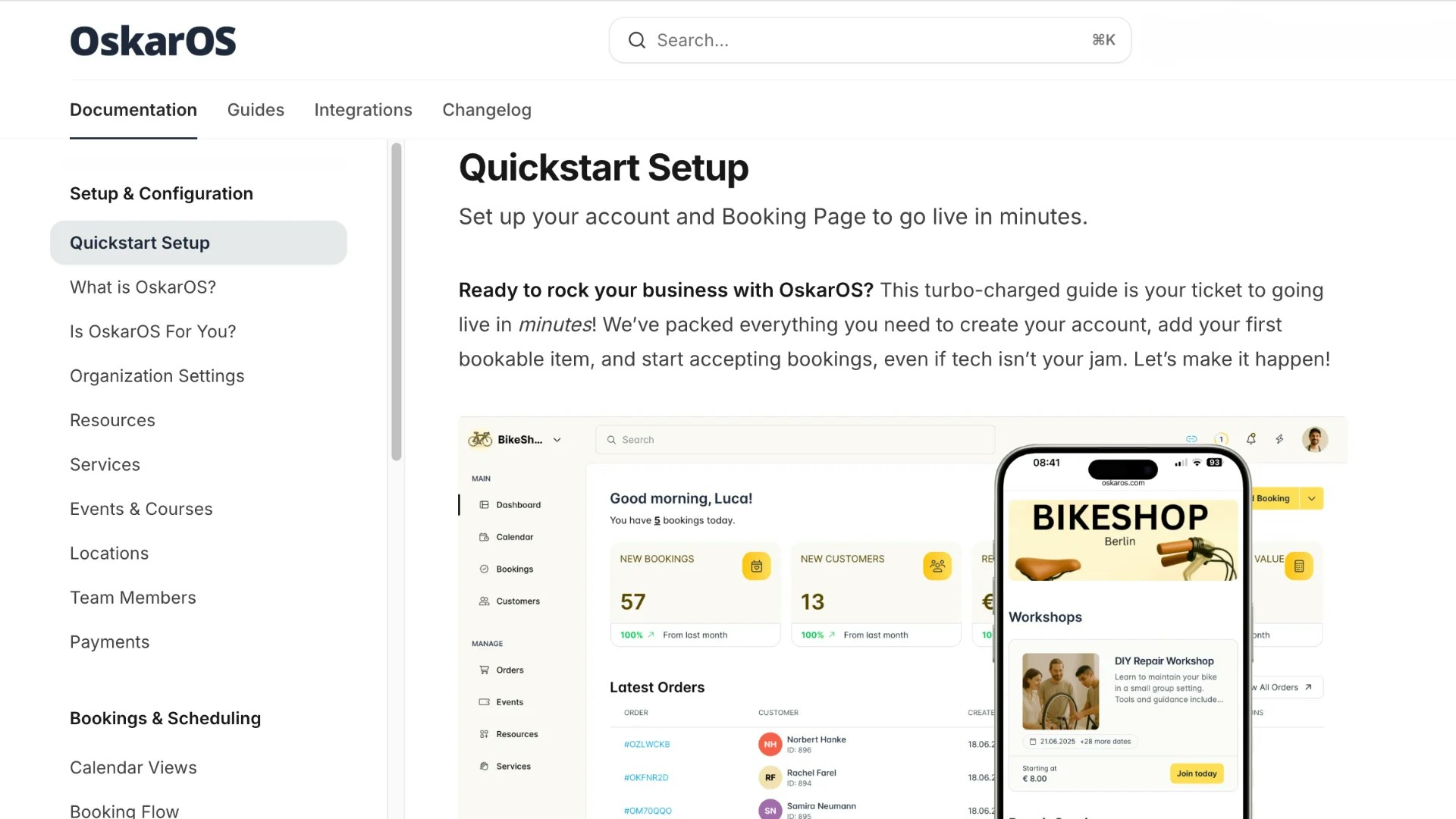 ***Our new OskarOS documentation is finally live — faster, more comprehensive, and (hopefully) way more helpful.*** Keeping up with a fast-moving product isn’t easy. But now that we’ve anchored the core platform — and especially after we *accidentally deleted* the old docs (yes, one-click full deletion is apparently still a thing in 2025 🙃) — it was definitely time for a fresh start. 👉 [Check out the new OskarOS Documentation here](https://help.oskaros.com/)
*Missing something?* Just shout [here](https://www.oskaros.com/contact)— we’ve got you.
## April 2025: Fresh Look — OskarOS Gets a Full UX Overhaul
We’ve given the entire OskarOS interface a serious refresh — from navigation to booking flows to tiny interaction details. \*\**The goal?* \*\*Less friction, more clarity, and a UI that feels as modern as the businesses it supports. User noticed: A cleaner, calmer layout, smarter structure across pages with functional drawers, a more intuitive setup and creation processes.
## January 2025: OskarOS 0.96
This is a big update, which makes OskarOS even more powerful, bringing seamless integration and insights to your fingertips. We’ve upgraded our calendar sync to full two-way compatibility with [Google Calendar](https://help.oskaros.com/integrations/google-calendar#google-calendar), so your ***schedule*** stays in harmony across platforms. Plus, we’ve added [***Stripe online payments***](https://help.oskaros.com/integrations/stripe) for secure, effortless transactions and introduced analytics to help you grow smarter.
* Full two-way Google Calendar sync: Block slots in OskarOS from Google Calendar and sync OskarOS ***bookings*** back (set up in ***Settings > Calendar Sync***). Microsoft Calendar sync is coming soon—reach out at ***contact us here*** for early access.
* ***Stripe*** integration for online credit card ***payments***, configurable in ***Organization Menu > Organization Settings > Payment & Checkout***.
## August 2024: OskarOS 0.95
We focused on making your financial tracking and client relationships stronger. This release polished our ***payment*** tools and gave you a deeper view of your customers, so you can keep operations running like a well-oiled machine.
* Detailed ***payment*** status tracking in ***Left Menu > MANAGE > Orders***.
* Issue refunds directly from the order page, with automatic email confirmations to clients.
* Enhanced customer profiles in ***Left Menu > MAIN > Customers***, showing full booking and transaction history.
## June 2024: OskarOS 0.9
Organization got a big boost in this release, making your ***Booking Page*** clearer for clients and your admin tasks easier. We also spruced up the calendar for a better daily view.
* Added categories to group ***services*** and ***resources*** on your ***Booking Page***.
* Admin filtering for ***bookings*** by ***resource***, ***service***, or user in ***Left Menu > MAIN > Bookings***.
* Visual upgrades to the daily ***Calendar*** view, with indicators for long ***bookings*** and breaks.
## April 2024: OskarOS 0.8
This update was all about tailoring the experience and reaching more people. We added **customizable forms** and **multi-language support** to make OskarOS work for you and your clients, wherever they are.
* Custom intake forms for ***services*** to collect specific info, like medical history for yoga, in ***Left Menu > MANAGE > Services***.
* Multi-language support for your ***Booking Page***, set in ***Organization Menu > Customize Booking Page***.
* Improved tax and currency settings for your locale in ***Organization Settings > Payment & Checkout***.
## March 2024: OskarOS 0.7
We started connecting your ***schedule*** with external tools and made sharing easier. This release laid the groundwork for smoother workflows and better testing.
* One-way Google Calendar sync (import only) to block slots in OskarOS from Google Calendar events, set in ***Settings > Calendar Sync***.
* Direct links to ***services***, ***resources***, and ***events***, accessible by right-clicking in ***Left Menu > MANAGE***.
* Real-time booking flow preview in ***Organization Menu > Customize Booking Page***.
## February 2024: OskarOS 0.6
Customization and client engagement got better with tools to control what clients see and encourage them to book. We also added early no-show tracking.
* Hide or show ***Booking Page*** elements in ***Organization Menu > Customize Booking Page***.
* Checkout timer to add urgency and reduce abandoned ***bookings***, set in ***Organization Settings***.
* Basic no-show tracking for internal use in ***Left Menu > MAIN > Dashboard***.
## December 2023: OskarOS 0.5
Complex setups became simpler with better organization and event tools, making OskarOS more flexible for your needs.
* ***Resource*** groups (e.g., “Lecture Halls”) in ***Left Menu > MANAGE > Resources***.
* Reorder booking flow steps in ***Organization Menu > Customize Booking Page***.
* Automatic participant limits for ***events*** and improved scheduling for recurring classes in ***Left Menu > MANAGE > Events***.
## November 2023: OskarOS 0.4
This release brought more control over ***resources*** and ***bookings***, with tools to track details and manage your ***schedule***.
* [***Sub-resources***](https://help.oskaros.com/documentation/faq/sub-resources#sub-resources) (e.g., individual desks or bikes) for precise tracking in ***Left Menu > MANAGE > Resources***.
* Log and reschedule ***bookings*** directly in ***Left Menu > MAIN > Calendar***.
* Add internal notes to ***bookings*** for richer metadata in ***Bookings***.
## September 2023: OskarOS 0.3
We made OskarOS more accessible and transparent, with mobile support and better tracking to keep you in the loop.
* Full mobile and \*\*PWA support \*\*for on-the-go management.
* “Admin Only” ***resources*** for internal use, set in ***Organization Menu > Customize Booking Page***.
* Activity log for admin actions, cart for multi-item checkouts, walk-in booking logging, and holiday mode to pause ***resource*** availability.
## August 2023: OskarOS 0.2
This was a big step for real-world operations, adding ***manual payments*** and team management to make OskarOS a true partner.
* ***Manual payments***, set in ***Organization Settings > Payment & Checkout***.
* Booking Flow Builder with preview in ***Organization Menu > Customize Booking Page***.
* Custom fields, team roles, recurring ***events*** and data export capabilities.
## June 2023: OskarOS 0.1
Our journey began with a lean, focused MVP that got you from sign-up to your first ***booking*** in minutes. It laid the foundation for everything to come.
**Core features**: Accepting ***bookings***, adding ***resources*** and ***services***, launching a ***Booking Page***, and managing a daily ***Calendar***.
***Our new OskarOS documentation is finally live — faster, more comprehensive, and (hopefully) way more helpful.*** Keeping up with a fast-moving product isn’t easy. But now that we’ve anchored the core platform — and especially after we *accidentally deleted* the old docs (yes, one-click full deletion is apparently still a thing in 2025 🙃) — it was definitely time for a fresh start. 👉 [Check out the new OskarOS Documentation here](https://help.oskaros.com/)
*Missing something?* Just shout [here](https://www.oskaros.com/contact)— we’ve got you.
## April 2025: Fresh Look — OskarOS Gets a Full UX Overhaul
We’ve given the entire OskarOS interface a serious refresh — from navigation to booking flows to tiny interaction details. \*\**The goal?* \*\*Less friction, more clarity, and a UI that feels as modern as the businesses it supports. User noticed: A cleaner, calmer layout, smarter structure across pages with functional drawers, a more intuitive setup and creation processes.
## January 2025: OskarOS 0.96
This is a big update, which makes OskarOS even more powerful, bringing seamless integration and insights to your fingertips. We’ve upgraded our calendar sync to full two-way compatibility with [Google Calendar](https://help.oskaros.com/integrations/google-calendar#google-calendar), so your ***schedule*** stays in harmony across platforms. Plus, we’ve added [***Stripe online payments***](https://help.oskaros.com/integrations/stripe) for secure, effortless transactions and introduced analytics to help you grow smarter.
* Full two-way Google Calendar sync: Block slots in OskarOS from Google Calendar and sync OskarOS ***bookings*** back (set up in ***Settings > Calendar Sync***). Microsoft Calendar sync is coming soon—reach out at ***contact us here*** for early access.
* ***Stripe*** integration for online credit card ***payments***, configurable in ***Organization Menu > Organization Settings > Payment & Checkout***.
## August 2024: OskarOS 0.95
We focused on making your financial tracking and client relationships stronger. This release polished our ***payment*** tools and gave you a deeper view of your customers, so you can keep operations running like a well-oiled machine.
* Detailed ***payment*** status tracking in ***Left Menu > MANAGE > Orders***.
* Issue refunds directly from the order page, with automatic email confirmations to clients.
* Enhanced customer profiles in ***Left Menu > MAIN > Customers***, showing full booking and transaction history.
## June 2024: OskarOS 0.9
Organization got a big boost in this release, making your ***Booking Page*** clearer for clients and your admin tasks easier. We also spruced up the calendar for a better daily view.
* Added categories to group ***services*** and ***resources*** on your ***Booking Page***.
* Admin filtering for ***bookings*** by ***resource***, ***service***, or user in ***Left Menu > MAIN > Bookings***.
* Visual upgrades to the daily ***Calendar*** view, with indicators for long ***bookings*** and breaks.
## April 2024: OskarOS 0.8
This update was all about tailoring the experience and reaching more people. We added **customizable forms** and **multi-language support** to make OskarOS work for you and your clients, wherever they are.
* Custom intake forms for ***services*** to collect specific info, like medical history for yoga, in ***Left Menu > MANAGE > Services***.
* Multi-language support for your ***Booking Page***, set in ***Organization Menu > Customize Booking Page***.
* Improved tax and currency settings for your locale in ***Organization Settings > Payment & Checkout***.
## March 2024: OskarOS 0.7
We started connecting your ***schedule*** with external tools and made sharing easier. This release laid the groundwork for smoother workflows and better testing.
* One-way Google Calendar sync (import only) to block slots in OskarOS from Google Calendar events, set in ***Settings > Calendar Sync***.
* Direct links to ***services***, ***resources***, and ***events***, accessible by right-clicking in ***Left Menu > MANAGE***.
* Real-time booking flow preview in ***Organization Menu > Customize Booking Page***.
## February 2024: OskarOS 0.6
Customization and client engagement got better with tools to control what clients see and encourage them to book. We also added early no-show tracking.
* Hide or show ***Booking Page*** elements in ***Organization Menu > Customize Booking Page***.
* Checkout timer to add urgency and reduce abandoned ***bookings***, set in ***Organization Settings***.
* Basic no-show tracking for internal use in ***Left Menu > MAIN > Dashboard***.
## December 2023: OskarOS 0.5
Complex setups became simpler with better organization and event tools, making OskarOS more flexible for your needs.
* ***Resource*** groups (e.g., “Lecture Halls”) in ***Left Menu > MANAGE > Resources***.
* Reorder booking flow steps in ***Organization Menu > Customize Booking Page***.
* Automatic participant limits for ***events*** and improved scheduling for recurring classes in ***Left Menu > MANAGE > Events***.
## November 2023: OskarOS 0.4
This release brought more control over ***resources*** and ***bookings***, with tools to track details and manage your ***schedule***.
* [***Sub-resources***](https://help.oskaros.com/documentation/faq/sub-resources#sub-resources) (e.g., individual desks or bikes) for precise tracking in ***Left Menu > MANAGE > Resources***.
* Log and reschedule ***bookings*** directly in ***Left Menu > MAIN > Calendar***.
* Add internal notes to ***bookings*** for richer metadata in ***Bookings***.
## September 2023: OskarOS 0.3
We made OskarOS more accessible and transparent, with mobile support and better tracking to keep you in the loop.
* Full mobile and \*\*PWA support \*\*for on-the-go management.
* “Admin Only” ***resources*** for internal use, set in ***Organization Menu > Customize Booking Page***.
* Activity log for admin actions, cart for multi-item checkouts, walk-in booking logging, and holiday mode to pause ***resource*** availability.
## August 2023: OskarOS 0.2
This was a big step for real-world operations, adding ***manual payments*** and team management to make OskarOS a true partner.
* ***Manual payments***, set in ***Organization Settings > Payment & Checkout***.
* Booking Flow Builder with preview in ***Organization Menu > Customize Booking Page***.
* Custom fields, team roles, recurring ***events*** and data export capabilities.
## June 2023: OskarOS 0.1
Our journey began with a lean, focused MVP that got you from sign-up to your first ***booking*** in minutes. It laid the foundation for everything to come.
**Core features**: Accepting ***bookings***, adding ***resources*** and ***services***, launching a ***Booking Page***, and managing a daily ***Calendar***.